画像認識② YoloV3を用いたWebカメラ画像の物体検出
この記事の目的
YoloV3を用いてWebカメラ画像から物体検出をしROS Topicで判定結果を出力する方法をまとめる
1. 移動ロボット用の物体検出アルゴリズム
移動ロボットの自律走行では、自車周辺の障害物を認識し車両制御(減速や停止、走行経路の計算など)で利用する必要がある。 その際、カメラ画像に障害物(人や車など)が含まれるかを認識する方法がよく用いられる。物体認識のアルゴリズムは日進月歩で進化しているが、本記事では高精度で計算速度に秀でたYoloV3を用いてWebカメラから物体を検出し、結果をROSトピックとして出力する方法について説明する。(物体認識アルゴリズムの歴史については下記記事が詳しい。)
物体認識の性能としては更に新しいM2Detという手法の方が高性能であるようだが、Pytorch (Python3.Xが必要)なのでROS対応が煩雑であるため今回は見送る。
なお、YoloV3にはROS用のパッケージも提供されているが、今回はWebカメラで読み込んだ画像をOpenCVで取り込んでYoloV3にかけるPythonスクリプトとして下記は利用せずに実装する。 (Webカメラ画像に前処理をかけたり、結果を加工する際に便利なため)
2. YoloV3のインストール/Python2+OpenCV用のインターフェース設定
YoloV3のインストールは公式サイトの手順で実行できる。
ソースのダウンロードと合わせて学習済みモデルを下記コマンドでダウンロードしておく。
#yolov3
wget https://pjreddie.com/media/files/yolov3.weights

#tiny-yolov3
wget https://pjreddie.com/media/files/yolov3-tiny.weights
MAKE時にGPUを有効(NVidia製 GPUを搭載したPCのみ)およびOpenCVの読み込みを行いたいのでMakefileの下記オプションを有効にする。
GPU=1
CUDNN=1
OPENCV=1
また、darknetのデフォルトでは画像形式はopencvの画像形式(numpyのndarray)を渡して検出結果を取得する手段が提供されていない。 ndarrayを渡して検出結果がpythonで取得できるように関数の一部を修正する。(下記サイトのQAを参考とした)
darknet/src/image.cの最後尾に関数を追加
image ndarray_to_image(unsigned char* src, long* shape, long* strides)
{
    int h = shape[0];
    int w = shape[1];
    int c = shape[2];
    int step_h = strides[0];
    int step_w = strides[1];
    int step_c = strides[2];
    image im = make_image(w, h, c);
    int i, j, k;
    int index1, index2 = 0;

    for(i = 0; i < h; ++i){
            for(k= 0; k < c; ++k){
                for(j = 0; j < w; ++j){

                    index1 = k*w*h + i*w + j;
                    index2 = step_h*i + step_w*j + step_c*k;
                    //fprintf(stderr, "w=%d h=%d c=%d step_w=%d step_h=%d step_c=%d \n", w, h, c, step_w, step_h, step_c);
                    //fprintf(stderr, "im.data[%d]=%u data[%d]=%f \n", index1, src[index2], index2, src[index2]/255.);
                    im.data[index1] = src[index2]/255.;
                }
            }
        }

    rgbgr_image(im);

    return im;
}
darknet/src/image.hに関数宣言を追加
#ifdef OPENCV
void *open_video_stream(const char *f, int c, int w, int h, int fps);
image get_image_from_stream(void *p);
image load_image_cv(char *filename, int channels);
image ndarray_to_image(unsigned char* src, long* shape, long* strides);
int show_image_cv(image im, const char* name, int ms);
#endif
darkne.pyに追加
from ctypes import *
import math
import random
import sys #追加
import cv2 #追加

#中略

predict_image = lib.network_predict_image
predict_image.argtypes = [c_void_p, IMAGE]
predict_image.restype = POINTER(c_float)

##以下を追加 (ndarryを読み込む処理)

ndarray_image = lib.ndarray_to_image
ndarray_image.argtypes = [POINTER(c_ubyte), POINTER(c_long), POINTER(c_long)]
ndarray_image.restype = IMAGE

##ここまで

#関数 detect_npをopencv用に追加
def detect_np(net, meta, np_img, thresh=.5, hier_thresh=.5, nms=.45):
    im = nparray_to_image(np_img)
    num = c_int(0)
    pnum = pointer(num)
    predict_image(net, im)
    dets = get_network_boxes(net, im.w, im.h, thresh, hier_thresh, None, 0, pnum)
    num = pnum[0]
    if (nms): do_nms_obj(dets, num, meta.classes, nms);
    res = []
    for j in range(num):
        for i in range(meta.classes):
            if dets[j].prob[i] > 0:
                b = dets[j].bbox
                res.append((meta.names[i], dets[j].prob[i], (b.x, b.y, b.w, b.h)))
    res = sorted(res, key=lambda x: -x[1])
    free_image(im)
    free_detections(dets, num)

    return res
#結果の可視化用関数
def check_detected_result_image(np_img,yolo_res):
    result_img = np_img
    for j in range(len(yolo_res)):
        left_top_x = int(yolo_res[j][2][0] - yolo_res[j][2][2] / 2)
        left_top_y = int(yolo_res[j][2][1] - yolo_res[j][2][3] / 2)
        right_top_x = int(yolo_res[j][2][0] + yolo_res[j][2][2] / 2)
        right_top_y = int(yolo_res[j][2][1] + yolo_res[j][2][3] / 2)
        result_img = cv2.rectangle(result_img, (left_top_x, left_top_y), (right_top_x, right_top_y),(255, 255, 255), 3)
        if len(yolo_res) > 0:
            font = cv2.FONT_HERSHEY_PLAIN
            cv2.putText(result_img, yolo_res[j][0],(max(int(yolo_res[j][2][0]) - 20, 0), int(yolo_res[j][2][1])), font, 3,(255, 255, 0), 1, cv2.LINE_AA)
            cv2.putText(result_img, str("{:.2}".format(yolo_res[j][1])),(max(int(yolo_res[j][2][0]) - 20, 0), int(yolo_res[j][2][1] + 40)), font, 3,(255, 0, 255), 1, cv2.LINE_AA)
    return result_img
上記スクリプトによりdetect_npを呼び出してopencvで読み込んだ画像(ndarray形式)に対する物体検出を行いcheck_detected_result_imageで検出結果の位置とラベルを可視化することができる。
3. Webカメラ画像の物体検出/ROS Topicの出力
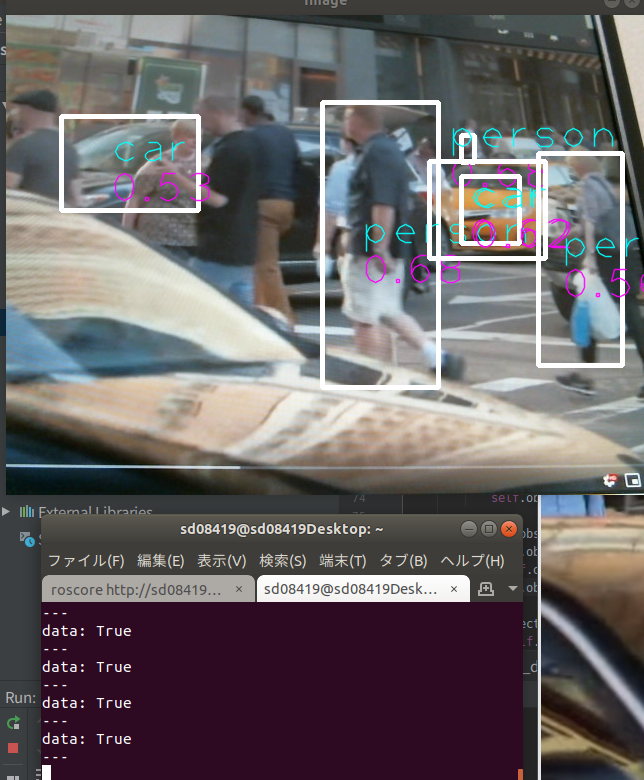
次に、上記を利用してWebカメラ画像からYoloV3で物体検出を行い障害物の有無をTrue/FalseでROSトピックとして出力する方法を検討する。 誤検出を減らすために、障害物が画面の比率に対してラベルを"person"のみとし、画面比率で10%の大きさで連続3フレーム以上検出で障害物と判定し連続5フレーム以上検出で障害物フラグを落とすようにする。 ライブラリ・モデルのパスはubuntuのフォルダ構成に合わせて修正する。darknetをインストールしたパスをbashrcのLD_LIBRARY_PATHに追加しておくと良い。
#!/usr/bin/env python
# -*- coding: utf-8 -*-
import cv2
import rospy
from std_msgs.msg import Bool
import numpy as np
from darknet import detect_np,load_net,load_meta,check_detected_result_image

###########################
# Webcam_Object_detection #
###########################
class Webcam_Object_detection():

    ##################
    # Initialization #
    ##################
    def __init__(self):

        rospy.init_node('Webcam_Object_detection', anonymous=True)
        r = rospy.Rate(50)  # 50hz

        #initialize webcam
        self.cap = cv2.VideoCapture(0)

        #load yolo_v3 parameters
        self.net = load_net("/home/xxxx/darknet/cfg/yolov3-tiny.cfg", "/home/xxxx/darknet/cfg/yolov3-tiny.weights", 0)
        self.meta = load_meta("/home/xxxx/darknet/cfg/coco.data")

        self.obstacle_label = ["person"]
        self.obstacle_ratio = 0.1
        self.obstacle_frame_th = 3
        self.obstacle_cancel_frame_th = 5
        ret, frame = self.cap.read()
        self.imsize = frame.shape[0]*frame.shape[1]
        self.obstacle_cnt = 0
        self.obstacle_flg = False

        #initialize publisher
        self.object_detect_publisher = rospy.Publisher("/object_detection", Bool, queue_size=50)

    def detect_object(self,event):
        ret, frame = self.cap.read()

        k = cv2.waitKey(1)
        r = detect_np(self.net, self.meta, frame)
        result_im = check_detected_result_image(frame, r)
        cv2.imshow('Image', result_im )
        cv2.waitKey(1)

        #check obstacle
        flg = False
        for indx in range(len(r)):  #Check detected objects
            for indx2 in range(len(self.obstacle_label)):   #check label name
                #Check Object Label
                if r[indx][0] == self.obstacle_label[indx2]:
                    ratio = r[indx][2][2]*r[indx][2][3]/self.imsize
                    if ratio > self.obstacle_ratio: #check object size (ratio per frame size)
                        flg = True
                        break
            if flg == True:
                break
        if flg == True:
            self.obstacle_cnt = min(self.obstacle_cnt + 1,self.obstacle_cancel_frame_th)
        else:
            self.obstacle_cnt = max(self.obstacle_cnt - 1, 0)

        if self.obstacle_cnt > self.obstacle_frame_th:
            self.obstacle_flg = True
        elif self.obstacle_cnt <= 0:
            self.obstacle_flg = False

        self.object_detect_publisher.publish(self.obstacle_flg)

if __name__ == "__main__":

    test = Webcam_Object_detection()
    rospy.Timer(rospy.Duration(0.1), test.detect_object)
    rospy.spin()
動作結果は下記のようになる。